Guides5. Check it
PageSpeed
Measure how fast each page is, and let Claude fix what slows it down.
PageSpeed scores every page for speed, accessibility, best practices and search, on mobile and desktop, the way Google measures it.
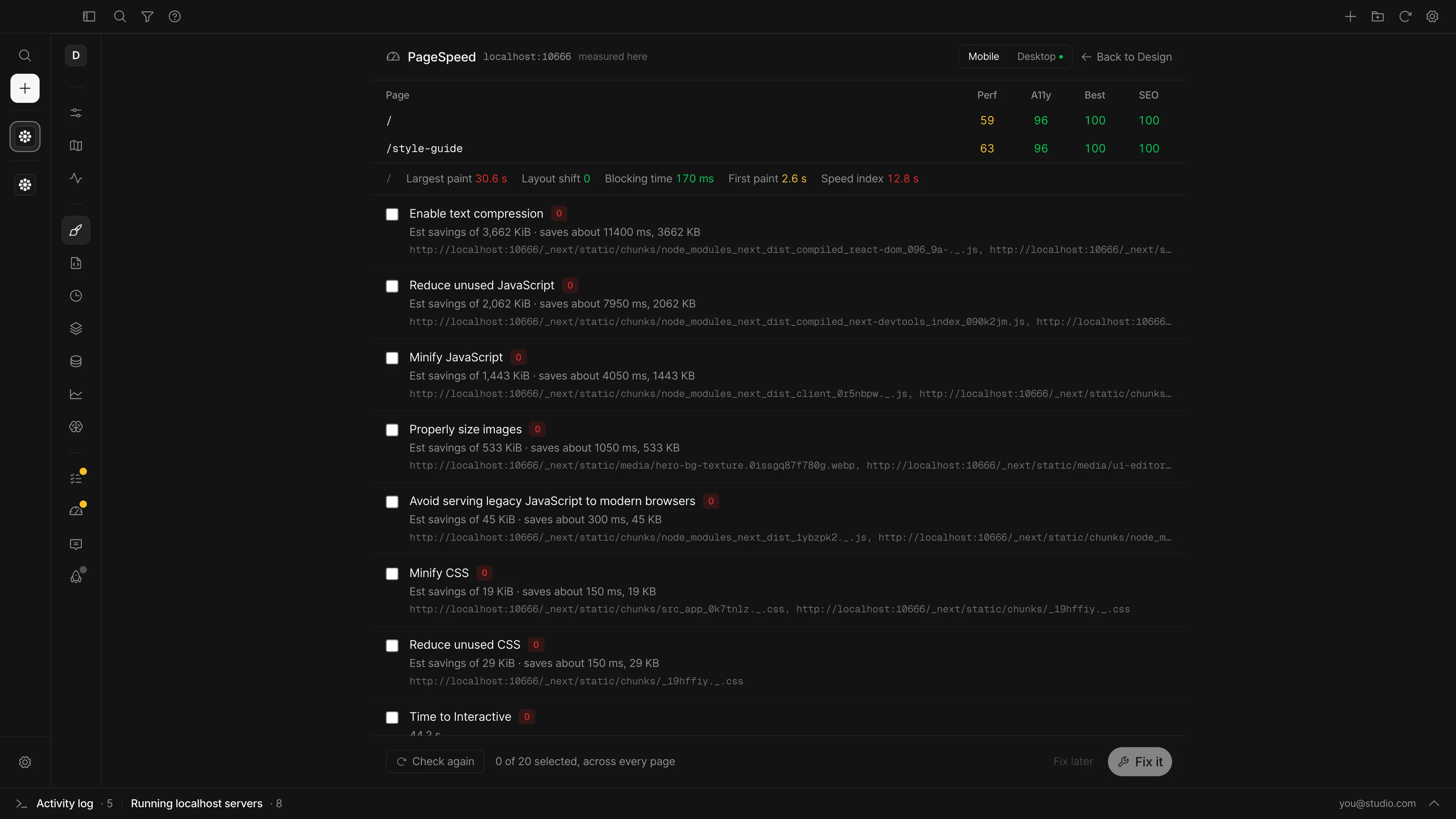
Measure
- Publish a preview first: Google measures a real address. See Publish a site.
- Click PageSpeed in the sidebar. It opens as a page in Design; Check again measures mobile, then desktop, and opens on the slowest page. Back to Design returns to the page.
- Pick which address to measure at the top: Production, Preview or This machine.
Scores are green from 90, amber from 50, red below.
Fix
- Click a page to see what lowers its score. The problems are already ticked.
- Click Fix it to send them to Claude, or Fix later to add them to your pins.
- Click Check again after the fix is published.
If the report says This address is behind an access wall, Vercel is asking visitors to sign in. Measure Production instead, or turn off Deployment Protection in Vercel.