Assets, images & SVG
Set up export containers so every image, icon, logo and SVG comes across crisp and correctly named.
devlooper fetches every image, icon, logo and decorative SVG by the node ID of its export container and drops it into the build. Get the container and the export-readiness right and assets land exactly; get them wrong and you get a missing element on the page.
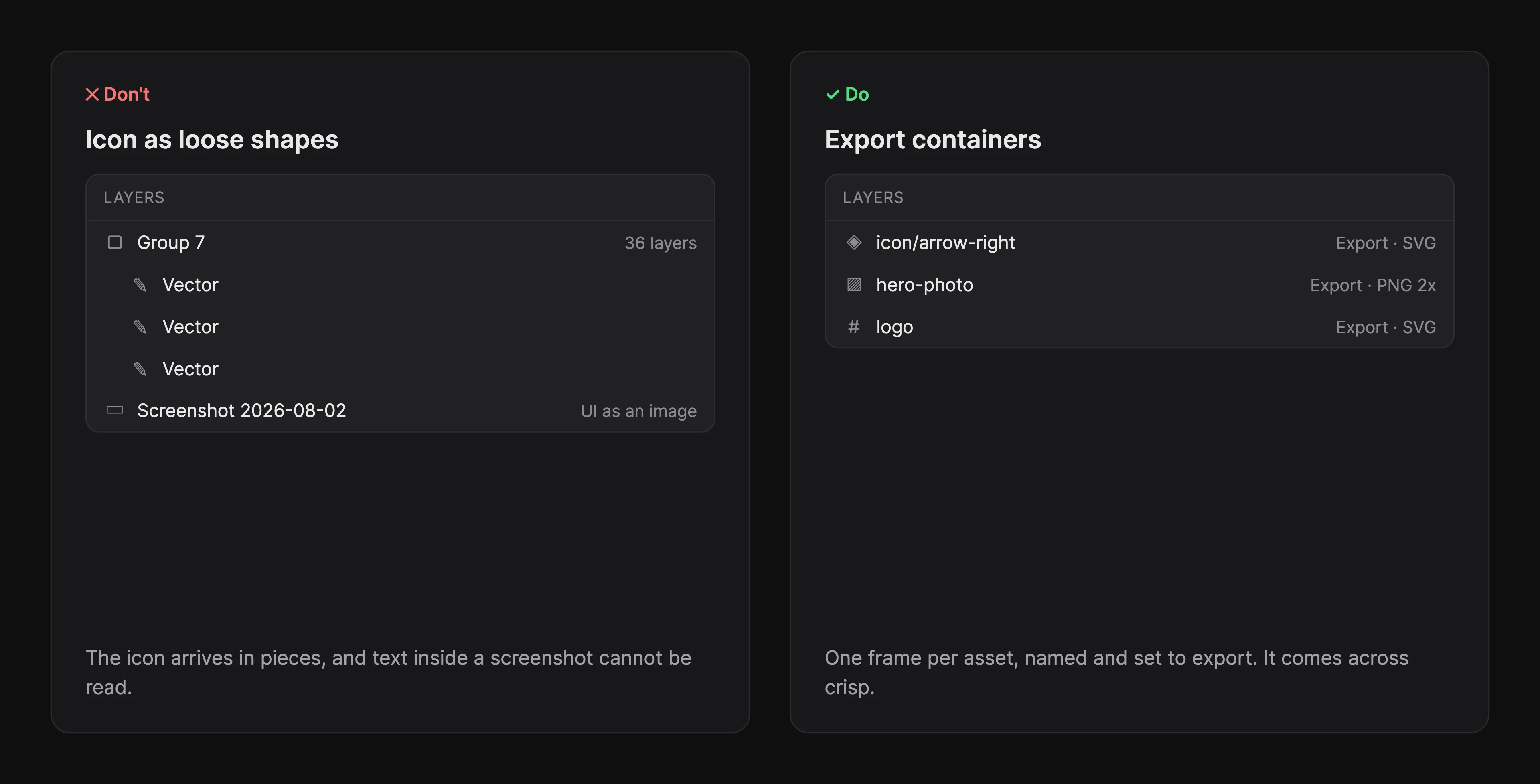
Export by container, not by child
Figma exports the whole subtree from a container. So the asset the tool fetches
must be the FRAME or GROUP that wraps all the vectors of that asset - never an
individual VECTOR child.
- A logo made of
FRAME → GROUP → VECTOR ×5→ the FRAME is the asset. - Fetching one inner vector gives you a fragment of the logo.
What you can do to make this reliable:
- Wrap each logo / icon / illustration in one clean, well-named frame or group.
logo,icon-shield,illustration-hero- notVector, notGroup 12. - Flatten decorative SVGs that are meant to render as a single shape (blobs, waves, dividers) into one clean vector layer where possible.
- Don't scatter the pieces of one icon across unrelated groups.
The #1 asset mistake: rasterising UI
Do not flatten structured UI to a PNG/JPG. A frame whose content is really UI - a diagram or flow (labelled boxes + connectors, "Seller → Buyer"), a faux dashboard or app screenshot, a chart with axis labels, a card mock with copy - must be rebuilt from layers, not exported as an image.
Why: a rasterised UI ships as soft, unselectable, non-responsive pixels the loop cannot fix or refine. Rebuilt UI is real HTML/CSS - crisp, responsive, editable.
So, for anything that's really UI:
- Keep it as real layers (auto-layout frames, text, shapes) with correct naming and tokens. devlooper will rebuild it faithfully from that structure.
- Don't merge/outline/flatten it into one image "to be safe" - that removes exactly the information the rebuild needs.
What IS a real asset (keep as an export)
- Photographs and headshots
- Logos and icons
- Decorative SVG shapes (blobs, waves, dividers, full-bleed art)
- Textures and complex illustrations that genuinely can't be rebuilt from shapes + text
Tiebreaker: mostly editable text, boxes and lines → it's UI → keep as layers. A photograph or rendered illustration with no editable text → it's an asset → export.
SVG specifics
For decorative SVGs, section dividers and full-bleed shapes, make these legible in the file (they're easy to get wrong in code):
- Full-bleed shapes should genuinely span their section - don't leave a hairline gap at the edge, and set the frame so it's clear the shape bleeds.
- Keep the viewBox clean - a tidy coordinate space (e.g.
0 0 1440 320) exports predictably. - Decide stretch vs fit - a divider that should stretch full-width vs an icon that must keep its aspect ratio. Model that with the frame's constraints/sizing so it's unambiguous.
Faint / full-bleed decoration - make it survive
A pixel diff barely registers subtle, large-area elements, so they vanish from a build unless they're clearly in the design. Help them survive by keeping them as real, named layers rather than merged into a background:
- Background grid / guide lines - column rulers, section dividers, baseline
grids. In Figma these are usually thin
VECTORlines (a vertical line haswidth: 0, a horizontal line hasheight: 0) with a low-opacity stroke. Keep them as distinct line layers pinned to the grid - don't bake them into a background image. - Hairlines, near-background borders, ghost/low-opacity text, watermarks, repeating textures, full-bleed blurs - keep each as its own visible layer with a clear name. If it's visible in Figma but a screenshot would shrug at it, it needs to be an explicit layer, not an afterthought.
Hidden layers
devlooper skips every layer with visible: false (and its whole subtree) - for
both structure and assets. Use this to your advantage, but mind the caveat:
- Do: hide/delete old variants, disabled states, exploration and helper layers so they don't leak into the build. Hidden = ignored, which is what you want for scaffolding.
- Caveat:
visible: falseis not the same as "faint." A low-opacity but genuinely visible element (a 5% stroke, a ghost background line) is real design and is kept. Only actually-hidden layers (oropacity: 0) are dropped. - Don't hide something you actually want on the page and expect it to render.
Quick self-check
- Is every logo/icon/illustration in one clean, named frame or group?
- Any diagram / dashboard / chart / card-mock flattened to an image? → un-flatten it into layers.
- Any leftover exploration or old variants inside the handoff frame? → hide or delete.
- Are full-bleed shapes and faint grid lines still real, named layers?